
Tachyon Edge
Tachyon Edge is an image service for the Tachyon WordPress plugin. It runs as a single Cloudflare Worker, processes images with the Cloudflare Images binding, and reads Originals from R2 or over HTTP.
It is a drop-in replacement for Human Made Tachyon v3.0.8 as far as the plugin is concerned. URLs, arguments, output sizes, crops, formats, status codes and cache headers follow the Plugin Contract (ADR 0006). Pixels and file sizes differ, because the encoder is Cloudflare’s rather than Sharp’s.
Architecture
Section titled “Architecture”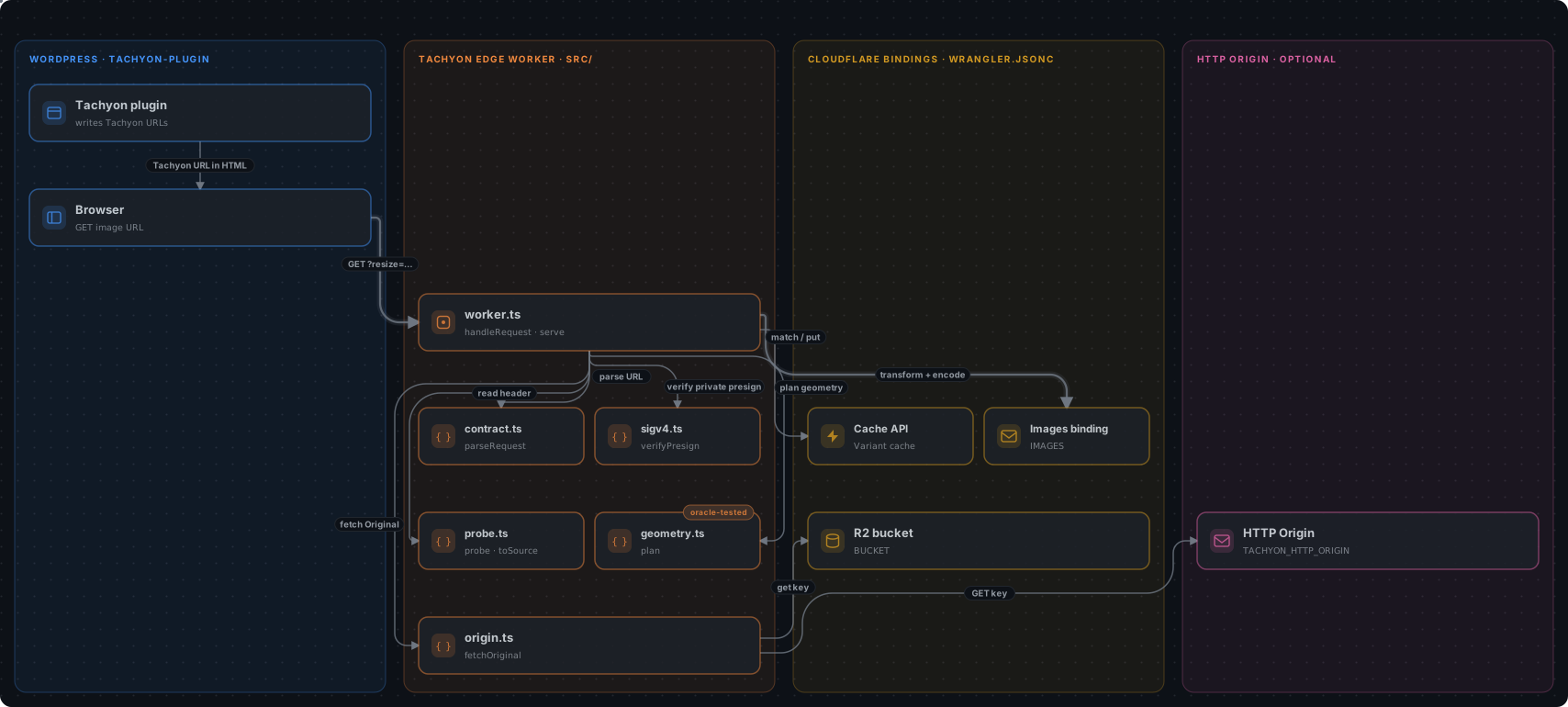
A public request that misses the cache:
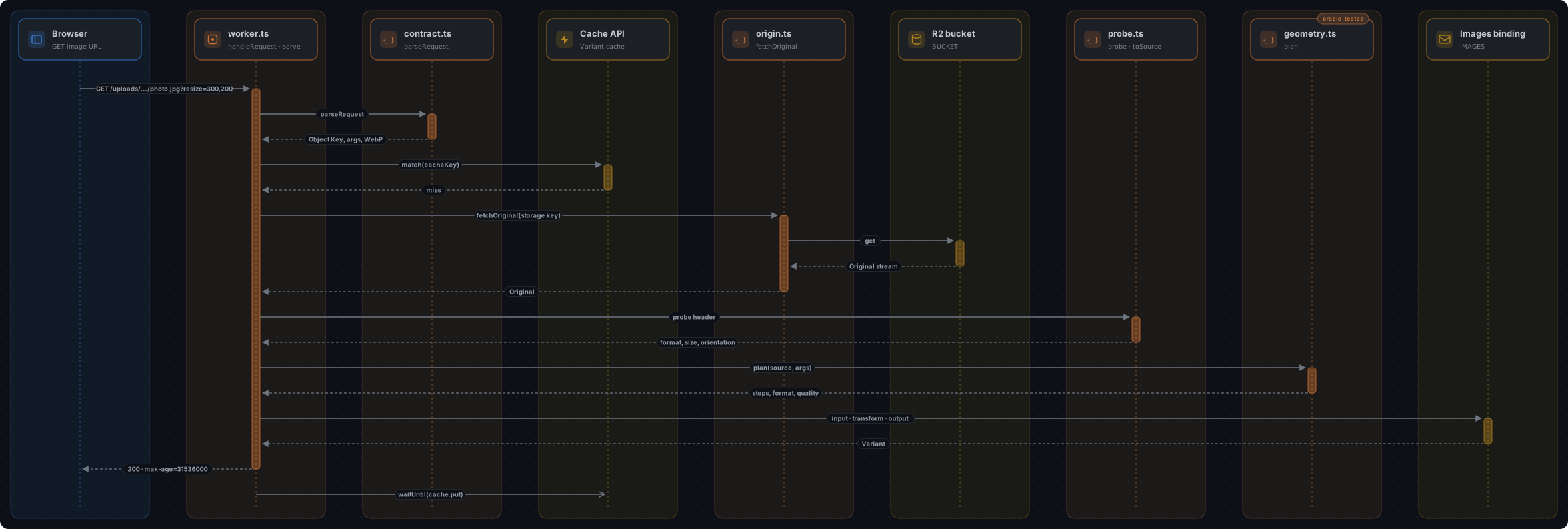
The private, presigned flow and the diagram sources are in docs/diagrams.
Diagrams created with Illustrate Design.
The Worker does not rely on Cloudflare’s fit heuristics. geometry.ts reproduces the arithmetic of Tachyon’s Sharp pipeline, including withoutEnlargement rounding, JPEG shrink-on-load, EXIF rotation, zoom and the px Release Quirks. It then sends the binding explicit pixel operations (ADR 0007). A test oracle runs Tachyon v3.0.8’s own code to check that the dimensions match (ADR 0011).
Components, request flow, invariants and where to make changes are described in docs/architecture.md. Decisions are recorded in docs/adr. The project language is in GLOSSARY.md.
Deploy
Section titled “Deploy”You need a Cloudflare account with Images enabled; the binding is billed per unique transformation. You also need Node 24.
npm cinpx wrangler loginnpx wrangler r2 bucket create tachyon-uploads # or change bucket_name in wrangler.jsoncnpx wrangler deployThen copy your uploads into the bucket so that the Object Keys match the path after the Worker host. For example, uploads/2026/11/photo.jpg is served at https://<worker>/uploads/2026/11/photo.jpg. rclone and R2 Super Slurper can copy an existing S3 bucket.
Configuration
Section titled “Configuration”Set these variables in wrangler.jsonc:
| Variable | Purpose |
|---|---|
TACHYON_ORIGIN | r2 (default) reads from the BUCKET binding. http fetches from TACHYON_HTTP_ORIGIN. |
TACHYON_HTTP_ORIGIN | Base URL for the HTTP Origin, e.g. https://example.com/wp-content/. Upstream 403 and 404 become 404; other failures become 502. |
TACHYON_R2_BUCKET | Name of the bucket bound as BUCKET. It separates cached Variants per bucket. wrangler deploy fails if it differs from bucket_name, and the Worker skips its cache if it is empty. |
TACHYON_KEY_PREFIX | Prepended to every Object Key before the Origin lookup. |
TACHYON_PRIVATE_PREFIXES | Comma-separated storage key prefixes (TACHYON_KEY_PREFIX + Object Key) that require a valid presign, e.g. uploads/private/. |
TACHYON_SIGNING_ACCESS_KEY_ID | The access key ID WordPress signs private URLs with. |
TACHYON_SIGNING_HOST | Host in the presigned URL, e.g. <account>.r2.cloudflarestorage.com or bucket.s3.eu-west-1.amazonaws.com. |
TACHYON_SIGNING_PATH_PREFIX | Path before the key in the presigned URL, e.g. /bucket for path-style URLs. Leave it empty for virtual-hosted URLs. |
The matching secret is set with npx wrangler secret put TACHYON_SIGNING_SECRET_ACCESS_KEY. For local development, copy .dev.vars.example to .dev.vars.
Private prefixes fail closed. If signing credentials are missing, every private request returns 404 and the Worker logs a configuration error (ADR 0009).
WordPress
Section titled “WordPress”Install the Tachyon plugin and point it at the Worker:
define( 'TACHYON_URL', 'https://tachyon-edge.<subdomain>.workers.dev/uploads' );define( 'TACHYON_SERVER_VERSION', '3.0.0' ); // presigned private images use `presign=`To serve WebP to browsers that accept it, add a Transform Rule or another Worker in front that sets X-WebP: 1 when Accept contains image/webp. The Worker caches WebP and non-WebP Variants separately.
Uploading images
Section titled “Uploading images”The Tachyon plugin only rewrites image URLs; it never uploads files. To get new uploads into the bucket, use one of these plugins. Both write to the Object Keys the Worker expects (uploads/…, or uploads/sites/N/… on multisite). Create an R2 API token with Object Read & Write on the bucket for either one.
| S3 Uploads (Human Made) | Tachyon R2 | |
|---|---|---|
| Install | Composer | Release zip |
| What goes to R2 | All uploads | Images the Worker serves; other files stay local |
| Local files | Never written | Kept (sync), deleted after upload (offload) or never written (stream) |
| Thumbnails | Written to R2 | Written to R2, or skipped and resized by Tachyon on request |
| Private uploads | Signed URLs; set TACHYON_PRIVATE_PREFIXES (R2 ignores the private ACL) | Not supported |
S3 Uploads
Section titled “S3 Uploads”composer require humanmade/s3-uploadsdefine( 'S3_UPLOADS_BUCKET', 'tachyon-uploads' );define( 'S3_UPLOADS_REGION', 'auto' );define( 'S3_UPLOADS_KEY', '...' ); // R2 access key IDdefine( 'S3_UPLOADS_SECRET', '...' ); // R2 secret access keydefine( 'S3_UPLOADS_BUCKET_URL', 'https://tachyon-edge.<subdomain>.workers.dev' ); // Originals through the WorkerPoint the S3 client at R2 in an mu-plugin, for example wp-content/mu-plugins/s3-uploads-r2.php:
add_filter( 's3_uploads_s3_client_params', function ( $params ) { $params['endpoint'] = 'https://<account_id>.r2.cloudflarestorage.com'; $params['use_path_style_endpoint'] = true; return $params;} );R2 has no per-object ACLs, so attachments S3 Uploads marks private are not protected by the bucket. Put them under a prefix listed in TACHYON_PRIVATE_PREFIXES and set the TACHYON_SIGNING_* variables so the Worker checks the presigned URLs (ADR 0009).
Tachyon R2
Section titled “Tachyon R2”Download tachyon-r2.zip from the latest release, install and activate it, then configure it in Settings → Tachyon R2 or in wp-config.php:
define( 'TACHYON_R2_ACCOUNT_ID', '...' );define( 'TACHYON_R2_ACCESS_KEY_ID', '...' );define( 'TACHYON_R2_SECRET_ACCESS_KEY', '...' );define( 'TACHYON_R2_BUCKET', 'tachyon-uploads' );define( 'TACHYON_R2_MODE', 'offload' ); // sync | offload | streamdefine( 'TACHYON_R2_SKIP_THUMBNAILS', true ); // optionalThe key prefix is taken from the path of TACHYON_URL. Check the connection with wp tachyon-r2 status, and copy an existing library with wp tachyon-r2 sync --all. See the Tachyon R2 README for the upload methods and limitations.
Differences from Tachyon v3.0.8
Section titled “Differences from Tachyon v3.0.8”These are listed in ADR 0006:
- Images: Variants have the same dimensions, but the pixels and file sizes are not byte-identical. EXIF and ICC metadata are stripped, except copyright. PNGs are truecolor rather than palette, so they are larger.
- Animation: percentage crops and
entropy/attentionon animated images return an image instead of Tachyon’s error. zoom: a fractional zoomed size is rounded instead of causing an error.- AVIF: output is labelled
image/avif, notimage/heif, and is capped at 1,200 px. Cloudflare documents AVIF Originals as Enterprise-only, but they worked on a non-Enterprise account in testing (ADR 0007). - Size limits: Originals over 20 MB, and animations whose frames total 100 megapixels or more, are served unmodified.
Development
Section titled “Development”npm test # geometry oracle, plugin contract, SigV4 and Worker testsnpm run lintnpm run check:worker # type-check against @cloudflare/workers-typesnpx wrangler deploy --dry-runSharp is a dev dependency only. It runs the Tachyon v3.0.8 oracle (tests/oracle) and backs the fake Images binding (tests/helpers/fake-images.ts). The wrangler dev Images simulation is low-fidelity. Before production traffic, run the remote smoke test against a deployed Worker (ADR 0011). Deploy with TACHYON_PRIVATE_PREFIXES=uploads/private/ and no signing credentials, then:
node tests/remote/prepare.mjs /tmp/tachyon-smoke tachyon-uploadsTACHYON_SMOKE_URL=https://<worker>/uploads/ TACHYON_SMOKE_FIXTURES=/tmp/tachyon-smoke npm run test:remoteThe WP-CLI acceptance test installs the Tachyon plugin on a WordPress site, uploads media and checks every image URL WordPress generates against the deployed Worker (docs/acceptance-test.md):
TACHYON_URL=https://<worker>/uploads node tests/acceptance/wp-site.mjs prepareTACHYON_URL=https://<worker>/uploads npm run test:acceptanceAPI reference
Section titled “API reference”See docs/using.md.
📦 Source: soderlind/tachyon-edge · Edit on GitHub