
Jev Mail Triage for Proton Mail
Find spam and phishing in your Proton Mail inbox — locally, safely, and without touching your mail until you say so.
An independent tool; not affiliated with or endorsed by Proton AG or TypeSafe.
Jev Mail Triage runs on your Mac, reads new messages through Proton Mail Bridge, and asks TypeSafe.ai’s Jev model two questions about each one:
- Is this unsolicited spam?
- Is this a scam or phishing attempt?
By default it only records the answers (dry-run). Messages are moved to a
Jev Review folder only if you explicitly turn that on. Nothing is ever deleted.
Apple Mail shows any moves automatically, because it is connected to the same
Bridge account.
An optional local gate decides the obvious cases on your Mac, so fewer messages need to be sent to TypeSafe.
[!IMPORTANT] Privacy: for each message assessed by Jev, the sender, subject, a shortened text body, and link addresses are sent to TypeSafe. That data leaves Proton’s end-to-end encrypted environment. Use this tool only if you are comfortable with that. Messages decided by the local gate in
enforcemode are not sent.
What you need
Section titled “What you need”- A Mac with Proton Mail Bridge installed, signed in, and running.
- Python 3.11 or later.
- A TypeSafe API key with access to a Jev model.
Your Mac and Bridge must stay running for the service to check mail.
Quick start
Section titled “Quick start”1. Install
Section titled “1. Install”git clone https://github.com/soderlind/jev-mail-triage.gitcd jev-mail-triagepython3 -m venv .venvsource .venv/bin/activatepython -m pip install --upgrade pippython -m pip install -e '.[dev]'2. Create your config file
Section titled “2. Create your config file”mkdir -p ~/.config/jev-mail-triagecp config.example.toml ~/.config/jev-mail-triage/config.toml3. Copy your settings from Bridge
Section titled “3. Copy your settings from Bridge”Open Proton Mail Bridge, select your account, and open Mailbox details → IMAP. You will see a host, port, security mode, username, and password.
Edit ~/.config/jev-mail-triage/config.toml and fill in the [bridge] section:
| Config setting | Where to find it in Bridge |
|---|---|
host | IMAP host (usually 127.0.0.1) |
port | IMAP port (often 1143) |
security_mode | starttls or implicit_tls, exactly as shown |
username | IMAP username (usually your email address) |
Do not put the password in the config file. You will store it in Keychain in the next step.
4. Store your secrets in macOS Keychain
Section titled “4. Store your secrets in macOS Keychain”.venv/bin/jev-mail-triage secret set bridge-password.venv/bin/jev-mail-triage secret set typesafe-api-keyEach command asks you to paste the secret. Nothing is shown on screen.
- Bridge password: copy it from Mailbox details → IMAP → Password in Bridge. This is a Bridge-generated password, not your Proton account password.
- TypeSafe API key: copy it from your TypeSafe account.
Never share these in screenshots or chat. If one leaks, rotate it (see Troubleshooting).
[!TIP] The commands use
~/.config/jev-mail-triage/config.tomlby default. To use another file, add--config /path/to/config.tomlbefore the command, for examplejev-mail-triage --config my.toml poll.
5. Check that it connects
Section titled “5. Check that it connects”.venv/bin/jev-mail-triage pollThe first run records a baseline: it notes where your Inbox currently ends
and skips existing messages. From then on, only new arrivals are assessed.
poll never moves mail.
6. (Optional) Assess some existing messages
Section titled “6. (Optional) Assess some existing messages”.venv/bin/jev-mail-triage backfill --limit 25 --dry-runThis assesses up to 25 of your newest existing messages without moving them. Each assessed message is sent to TypeSafe and may use API credits.
7. Run it continuously
Section titled “7. Run it continuously”.venv/bin/jev-mail-triage serveThis checks for new mail every 60 seconds. Press Ctrl+C to stop. To run it in
the background at login, see Run in the background.
8. Review the results
Section titled “8. Review the results”.venv/bin/jev-mail-triage status.venv/bin/jev-mail-triage candidates --headersstatus shows counts. candidates --headers lists the messages Jev considers
spam or phishing, with subject, sender, and date, so you can check whether it
got them right.
Everyday commands
Section titled “Everyday commands”| Command | What it does | Changes mail? |
|---|---|---|
poll | Checks for new mail once | Never |
serve | Checks for new mail every 60 seconds | Only if moves are enabled |
status | Shows counts per status; no message content | No |
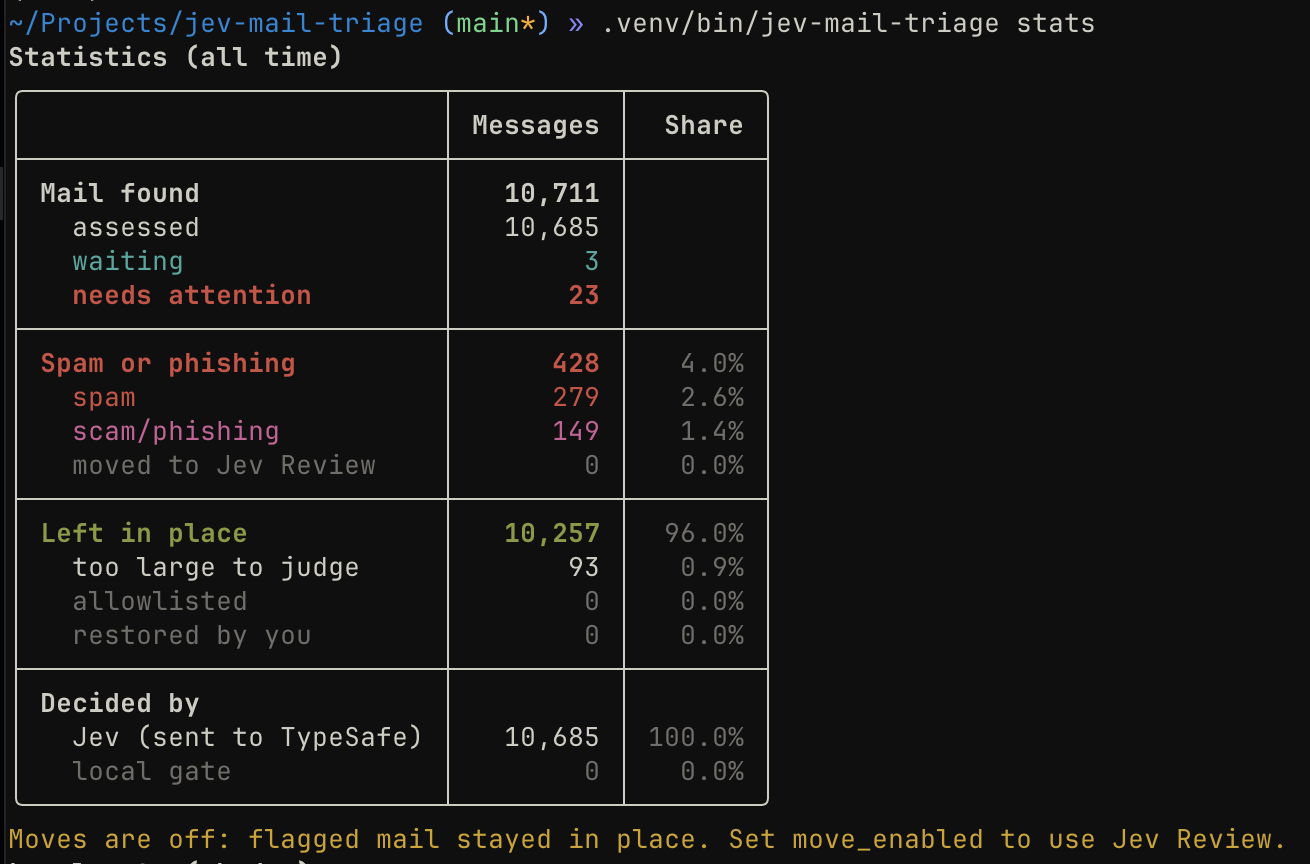
stats | Totals: spam, scam/phishing, moved, and who decided | No |
candidates | Lists the 20 newest spam/phishing decisions (scores and IDs) | No |
candidates --headers | Same, plus subject, sender, and date fetched from Bridge | No |
backfill --limit N | Assesses up to N existing messages, newest first (max 1,000) | Only if moves are enabled |
backfill --limit N --dry-run | Same, but never moves anything | Never |
retry --limit N | Tries failed assessments again | No (they are re-queued) |
train --limit N | Trains the local gate from your folders (default 500 per folder) | Never (read-only) |
evaluate --labels FILE.csv | Measures accuracy against labelled test emails | No |
secret set NAME | Stores a secret in Keychain | No |
Prefix each command with .venv/bin/jev-mail-triage, or activate the virtual
environment first (source .venv/bin/activate) and run jev-mail-triage.
Useful options:
stats,status,candidates,train, andevaluateprint tables, with colour in a terminal. SetNO_COLOR=1to turn colour off.status --json,stats --json, andcandidates --jsonprint machine-readable output.stats --days 7limits the totals to mail found in the last 7 days.candidates --limit 100shows more results (maximum 1,000).
[!NOTE]
--dry-runprevents mailbox changes, but messages are still sent to TypeSafe for assessment.
Understanding the output
Section titled “Understanding the output”assessed— the message was checked.move_decision— Jev scored it at or above a threshold. In dry-run mode this means “would have moved”, not that it was moved.local_spam/local_clean(instatus) — the local gate’s verdicts.local_disagreecounts messages where the local gate and the final decision disagreed; watch it while in shadow mode.baseline/rebaseline— the service recorded a new starting point and skipped existing mail. A rebaseline happens when the mailbox identity changes, for example after removing and re-adding the account in Bridge.
candidates reads only the local database and can run while serve is running.
Only --headers contacts Bridge. It opens the Inbox read-only, so messages stay
unread. Headers are printed on your screen only; they are not stored or sent to
TypeSafe.
Turning on automatic moves
Section titled “Turning on automatic moves”Start in dry-run mode, review candidates --headers for a while, and only enable
moves once you trust the results.
-
Review the thresholds in the
[policy]section of your config:move_enabled = falsespam_threshold = 0.98scam_threshold = 0.95A message is a candidate when either score is at or above its threshold. Lower values catch more messages but increase the risk of false positives. These defaults are provisional, not validated guarantees. Calibrate them with labelled test emails if you can.
-
Set
move_enabled = true. -
Restart
serve.
When moves are enabled:
- Only high-scoring messages are moved, into a
Jev Reviewfolder (configurable withreview_folder). Apple Mail shows it under your Proton account. - Uncertain and clean messages stay where they are.
- Messages whose content was too large to send in full are never moved.
- Nothing is ever deleted. Check
Jev Reviewand move any mistakes back. A message you move back to the Inbox is recognised and left alone; it is not assessed or moved again. If the local gate is on, it also learns from this.
[!NOTE] Changing thresholds affects future assessments only. Messages that were already assessed are not rescored.
Local gate
Section titled “Local gate”The local gate is a small filter that runs on your Mac before Jev. It answers only when it is confident and passes everything else to Jev. Checks run in this order:
- Header checks. With a trusted DMARC pass (see Allowlist), mail from your allowlist or from someone you have written to (a known correspondent, learned from your Sent folder) is clean.
- Allowed languages. If
allowed_languagesis set, mail written mostly in other languages is spam. Detection runs locally with Lingua and checks each sentence, so an English mail with a German signature is still allowed. Very short messages are not judged. The rule is skipped (the message goes to Jev) for people you have written to and for sender domains that often appear in your kept mail. - Near-duplicates of your junk. Mail that is almost identical to something in your Spam folder is spam, unless it also matches mail you kept.
- Bayes filter. A word-statistics filter trained on your Spam and Archive
folders, corrections, and confident Jev results. It gives verdicts only after
it has seen
min_examplesof each kind. It marks mail clean only if the sender’s domain often appears in your kept mail, the mail does not fail DMARC, and every link points to a site seen in your kept mail.
Local spam verdicts are handled like Jev’s: they go to Jev Review only when
moves are enabled.
Set mode in the [gate] section:
off— the gate is not used; every message goes to Jev.shadow(recommended start) — the gate records what it would have decided, but Jev still decides and every message is still sent to TypeSafe.enforce— confident local verdicts are used and those messages are not sent to TypeSafe.
Before switching to enforce, run train, let serve run in shadow mode for a
while, and check that status shows few local_disagree. Also check that
evaluate reports no local false positives.
Training
Section titled “Training”.venv/bin/jev-mail-triage traintrain reads your Spam, Archive, and Sent folders read-only (unread mail stays
unread), newest first, and remembers what it has already read. Moving a message
to Spam that was left in the Inbox counts as a correction, and so does moving a
message to Archive that was sent to review. Corrections count three times as
much as ordinary examples. train cannot run while serve is running; serve
retrains automatically every train_interval_seconds.
Folder names must match what Bridge shows; missing folders are reported and skipped.
Troubleshooting
Section titled “Troubleshooting”“Could not connect to Proton Mail Bridge”
Make sure Bridge is open and signed in. Check that host, port, and
security_mode match Mailbox details → IMAP exactly.
Login fails, or Bridge reports “no such user”
The username or password does not match Bridge. Copy both again from
Mailbox details → IMAP, then run secret set bridge-password.
My Bridge password was exposed
In Bridge, remove the account (trash icon) and add it again; this creates a new
password. Run secret set bridge-password again. Expect a rebaseline on the
next run.
Certificate or TLS errors
Certificate checks are always on and cannot be disabled. If macOS does not trust
the Bridge certificate, export it from Bridge as a PEM file and set tls_ca_file
in the [bridge] section. Do not install a global trust bypass.
Keychain error The program only stores secrets in macOS Keychain and refuses other storage backends.
Messages stuck as failed
Temporary TypeSafe or Bridge errors are retried automatically with increasing
delays. If a message still fails, run retry --limit 20. Moves with an unclear
outcome are never retried automatically; check those messages by hand.
move_decision is greater than zero, but nothing moved
That is expected in dry-run mode. See
Turning on automatic moves.
Run in the background
Section titled “Run in the background”The best way to keep the service running is a macOS LaunchAgent. It starts
jev-mail-triage serve when you log in, restarts it if it exits, and runs in
your login session, so it can read your Keychain secrets. A sample is included
at launchd/com.soderlind.jev-mail-triage.plist. This project never installs or
activates it for you.
Only do this after you have reviewed the dry-run results.
-
Install the LaunchAgent with your paths filled in. Run this from the project folder. The log-path substitutions must come before the executable path substitution.
Terminal window mkdir -p ~/Library/LaunchAgents ~/Library/Logssed -e "s#/absolute/path/to/jev-mail-triage.log#$HOME/Library/Logs/jev-mail-triage.log#" \-e "s#/absolute/path/to/jev-mail-triage-error.log#$HOME/Library/Logs/jev-mail-triage-error.log#" \-e "s#/absolute/path/to/jev-mail-triage#$PWD/.venv/bin/jev-mail-triage#" \launchd/com.soderlind.jev-mail-triage.plist \> ~/Library/LaunchAgents/com.soderlind.jev-mail-triage.plistplutil -lint ~/Library/LaunchAgents/com.soderlind.jev-mail-triage.plist -
Start it:
Terminal window launchctl bootstrap "gui/$(id -u)" \~/Library/LaunchAgents/com.soderlind.jev-mail-triage.plist -
Check that it is running:
Terminal window launchctl print "gui/$(id -u)/com.soderlind.jev-mail-triage" | grep -E "state|pid"tail -f ~/Library/Logs/jev-mail-triage*.log.venv/bin/jev-mail-triage status -
Restart it after changing the config. The service reads
config.tomlonly at startup, so changes to thresholds ormove_enabledneed a restart:Terminal window launchctl kickstart -k "gui/$(id -u)/com.soderlind.jev-mail-triage" -
Stop and unload it:
Terminal window launchctl bootout "gui/$(id -u)/com.soderlind.jev-mail-triage"
Things to know:
- Bridge must be running. Turn on “Start Bridge on startup” in Proton Mail Bridge settings. If Bridge is not running, the service retries with backoff.
- Keychain prompt. The first time the service runs in the background, macOS may ask whether Python can access your Keychain items. Choose Always Allow, otherwise the service cannot log in while you are away.
- Sleep. Nothing is checked while the Mac is asleep. Mail that arrived in the meantime is picked up on the first poll after it wakes.
- Crash loops. If the service keeps exiting, for example because of a config
error, launchd restarts it about every 10 seconds. If
statusstops changing, check~/Library/Logs/jev-mail-triage-error.log. - Moving the project folder breaks the absolute path in the LaunchAgent. Repeat step 1 after moving it.
- Dry-run first. While
move_enabled = false, the service only records decisions. Let it run for a while and reviewcandidatesbefore you turn on moves.
Measuring accuracy
Section titled “Measuring accuracy”You can measure how well Jev and your thresholds perform using labelled .eml
files. Create a CSV file next to them:
path,spam,scam_phishingnewsletter.eml,false,falsephishing.eml,false,truePaths are relative to the CSV. Then run:
.venv/bin/jev-mail-triage evaluate --labels ./fixtures/labels.csvThe report shows false positives, precision, recall (for spam, scam/phishing,
and combined), and how many messages would be sent for review. It uses your
configured thresholds and model. If the local gate is on, a local_gate line
shows how many files it decided and any local false positives (spam verdicts on
clean files) or missed spam (clean verdicts on spam or phishing files). In
enforce mode, the other figures use the local verdicts too. evaluate never
trains the gate.
Each file is sent to TypeSafe and may use API credits. Use synthetic or otherwise approved emails, not real inbox messages.
How it protects you
Section titled “How it protects you”Your mail
- Dry-run by default; moves require
move_enabled = true. - Never deletes mail.
- Reads messages with
BODY.PEEK, so unread mail stays unread. - Before moving a message, it checks that the message still exists and is
unchanged. It prefers IMAP
UID MOVE. Otherwise, it copies the message, verifies the copy, and removes only that one message. It never runs a broadEXPUNGE; if a move cannot be completed safely, it stops and flags the message. - Only one worker can run at a time.
Message content
- Emails are parsed locally. Plain text is preferred; HTML is converted to text, with scripts and styles removed.
- Links are listed but never opened. Remote images and other resources are never loaded, and message content is never executed.
- Attachments are never sent.
- Input is limited: up to 2 MiB is read from Bridge and up to 64 KiB is sent to
TypeSafe by default (
max_input_bytes). Truncated messages are never moved. - Email content is treated as untrusted data in the Jev prompt. The criteria separate spam from subscribed newsletters, receipts, and genuine correspondence. A link alone is not considered malicious. Norwegian and English are supported.
- The local gate runs entirely on your Mac; language detection uses no network.
Local storage
- The database (
~/Library/Application Support/jev-mail-triage/state.sqlite3) stores message identifiers, a content fingerprint, Message-ID, scores, model/policy versions, local gate verdicts, retry state, and move history. It does not store bodies, subjects, or senders. - If the local gate is on, the database also stores its model: counts of hashed words and link domains, short similarity signatures of training messages, and hashed addresses of people you have written to. No readable text is stored, but someone with the file could test whether a guessed word or address appears in it.
- Database and lock files are readable only by your user account.
- The Bridge password and TypeSafe API key are stored only in macOS Keychain.
- Logs contain status information and message numbers only, never credentials or message content.
Reference
Section titled “Reference”Configuration
Section titled “Configuration”| Section | Setting | Default | Meaning |
|---|---|---|---|
| (top) | database_path | Application Support | SQLite state file |
[bridge] | account_id | primary | Name used to find the Bridge password in Keychain |
host, port | 127.0.0.1, 1143 | Bridge IMAP address | |
security_mode | starttls | starttls or implicit_tls, as Bridge shows | |
username | — | Bridge IMAP username | |
mailbox | INBOX | Folder to check | |
tls_ca_file | (unset) | PEM certificate if macOS does not trust Bridge | |
[service] | poll_interval_seconds | 60 | Time between checks |
batch_size | 20 | Messages per check | |
max_attempts | 5 | Attempts before a message is marked as failed | |
backoff_max_seconds | 300 | Longest delay between attempts | |
[policy] | move_enabled | false | Allow moves in serve and backfill |
spam_threshold | 0.98 (provisional) | Minimum spam score for review | |
scam_threshold | 0.95 (provisional) | Minimum scam/phishing score for review | |
max_input_bytes | 65536 | Maximum text sent to TypeSafe | |
review_folder | Jev Review | Destination folder for moves | |
model | jev-latest | TypeSafe model | |
allowlist | [] | Trusted senders; see below | |
trusted_authserv_id | (unset) | Required for the allowlist | |
[gate] | mode | off | off, shadow, or enforce; see Local gate |
allowed_languages | [] (no rule) | ISO 639-1 codes; other languages are spam. no = nb + nn | |
spam_folders | ["Spam"] | Training folders with junk | |
ham_folders | ["Archive"] | Training folders with mail you kept | |
sent_folders | ["Sent"] | Source of known correspondents | |
min_examples | 50 | Spam and kept examples needed before Bayes verdicts | |
bayes_spam_threshold | 0.99 | Bayes score for a local spam verdict | |
bayes_clean_threshold | 0.01 | Bayes score for a local clean verdict | |
near_duplicate_similarity | 0.85 | Similarity to junk for a near-duplicate | |
learn_from_jev | true | Learn from confident Jev results | |
train_interval_seconds | 3600 | How often serve retrains; 0 disables |
Allowlist (advanced)
Section titled “Allowlist (advanced)”The allowlist prevents a move only when the sender address or domain matches
and a trusted Authentication-Results header (from trusted_authserv_id)
reports DMARC pass. Proton does not document that it adds or cleans these
headers, so configure this only if you have independently verified that the
named receiver is trusted and replaces forged headers. Missing or untrusted
authentication evidence never prevents a move.
The local gate’s known-correspondent check uses the same trusted DMARC pass.
Without trusted_authserv_id, both header checks are skipped. A contact whose
account is compromised can still pass these checks.
Mailbox resets
Section titled “Mailbox resets”If the mailbox identity (IMAP UIDVALIDITY) changes, the service records a new
baseline instead of reprocessing or moving old messages. Use a bounded
backfill if you want to assess messages that arrived during the reset.
Development
Section titled “Development”Tests use synthetic .eml files and fake IMAP/TypeSafe clients only:
python -m pytestpython -m ruff check src testsThe tests do not connect to Proton Mail Bridge, access a real mailbox, call TypeSafe, move messages, or activate a LaunchAgent.
License
Section titled “License”📦 Source: soderlind/jev-mail-triage · Edit on GitHub