
Redis Queue for WordPress
NOTE: This is experimental, you might not need it :bowtie:
Robust Redis-backed background job processing for WordPress. Provides prioritized, delayed, and retryable jobs with an admin UI, REST API, token-based auth (scopes + rate limiting), and extensibility for custom job types.
A production-ready queue system for WordPress, following best practices and patterns.
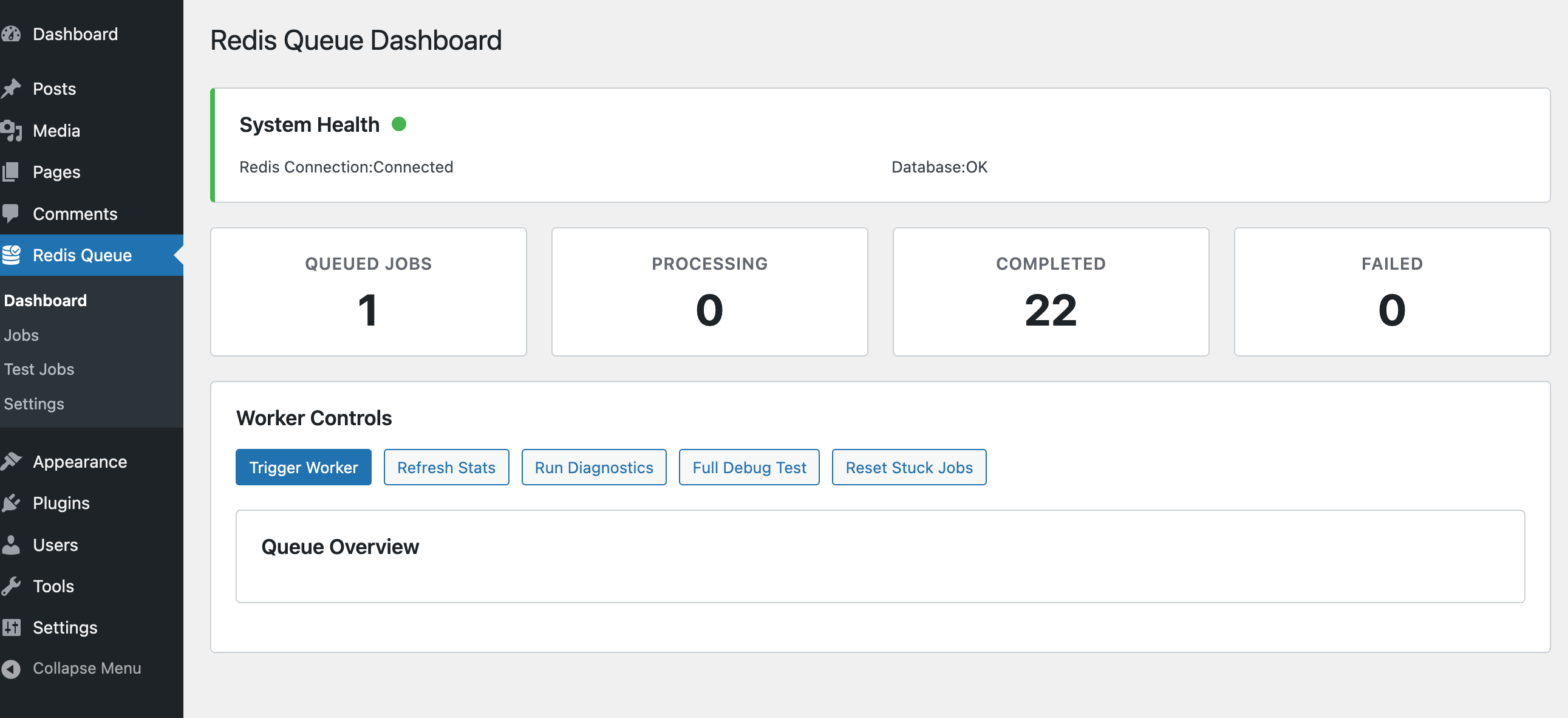
Feature Highlights
Section titled “Feature Highlights”Core:
- Priority + delayed + retryable jobs
- Redis (phpredis or Predis) abstraction
- Memory/timeouts and job metadata persistence
Built‑in Jobs:
- Email delivery (single/bulk)
- Image processing (thumbnails, optimization)
- Generic API / webhook style jobs
Interfaces:
- Admin dashboard (stats, browser, test tools, purge, debug)
- REST API (create jobs, trigger worker, health, stats)
Security & Control:
- Capability or API token auth
- Token scopes (
worker,full) - Per-token rate limiting
- Structured request logging with rotation
Extensibility:
- Simple
Abstract_Base_Jobsubclassing - Filters for dynamic job instantiation
TL;DR: see docs/README.md for overview, docs/usage.md for operations, and docs/extending-jobs.md for custom jobs.
WordPress Tasks That can Benefit from Redis Queues
Section titled “WordPress Tasks That can Benefit from Redis Queues”High-Impact Use Cases
Section titled “High-Impact Use Cases”1.1 Email Operations
Section titled “1.1 Email Operations”- Bulk email sending (newsletters, notifications)
- Transactional emails (order confirmations, password resets)
- Email campaign processing
- Benefits: Prevents timeouts, improves user experience, handles SMTP failures gracefully
1.2 Image Processing
Section titled “1.2 Image Processing”- Thumbnail generation for multiple sizes
- Image optimization (compression, format conversion)
- Watermark application
- Benefits: Reduces page load times, prevents memory exhaustion
1.3 Data Import/Export
Section titled “1.3 Data Import/Export”- CSV/XML imports (products, users, posts)
- Database migrations
- Content synchronization between sites
- Benefits: Handles large datasets without timeout issues
1.4 Content Processing
Section titled “1.4 Content Processing”- Search index updates (Elasticsearch, Algolia)
- Cache warming after content updates
- Content analysis (SEO scoring, readability)
- Benefits: Keeps content fresh without blocking user interactions
1.5 Third-Party API Integrations
Section titled “1.5 Third-Party API Integrations”- Social media posting (Facebook, Twitter, LinkedIn)
- CRM synchronization (Salesforce, HubSpot)
- Analytics data collection (Google Analytics, custom tracking)
- Benefits: Handles API rate limits and failures gracefully
1.6 E-commerce Operations
Section titled “1.6 E-commerce Operations”- Order processing workflows
- Inventory synchronization
- Payment verification processes
- Benefits: Ensures order integrity and improves checkout experience
1.7 Content Publishing
Section titled “1.7 Content Publishing”- Scheduled post publishing
- Content distribution to multiple platforms
- SEO metadata generation
- Benefits: Reliable scheduling and cross-platform consistency
Medium-Impact Use Cases
Section titled “Medium-Impact Use Cases”1.8 User Management
Section titled “1.8 User Management”- User registration workflows
- Profile data enrichment
- Permission updates across systems
1.9 Backup Operations
Section titled “1.9 Backup Operations”- Database backups
- File system backups
- Remote backup uploads
1.10 Analytics & Reporting
Section titled “1.10 Analytics & Reporting”- Report generation
- Data aggregation
- Performance metrics calculation
Installation
Section titled “Installation”Prerequisites
Section titled “Prerequisites”- WordPress: Version 6.7 or higher
- PHP: Version 8.3 or higher
- Redis Server: Running Redis instance
- Redis PHP Extension OR Predis Library: One of these for Redis connectivity
Redis Setup
Section titled “Redis Setup”Option 1: Install Redis PHP Extension
Section titled “Option 1: Install Redis PHP Extension”# Ubuntu/Debiansudo apt-get install php-redis
# macOS with Homebrewbrew install php-redis
# CentOS/RHELsudo yum install php-redisOption 2: Install Predis via Composer
Section titled “Option 2: Install Predis via Composer”# In your WordPress root or plugin directorycomposer require predis/predisPlugin Installation
Section titled “Plugin Installation”-
Quick Install
- Download
redis-queue.zip - Upload via Plugins > Add New > Upload Plugin
- Activate the plugin.
- Download
-
Composer Install
Terminal window composer require soderlind/redis-queue -
Updates
- Plugin updates are handled automatically via GitHub. No need to manually download and install updates.
Configuration
Section titled “Configuration”Redis Settings
Section titled “Redis Settings”Navigate to Redis Queue > Settings in your WordPress admin to configure:
- Redis Host: Your Redis server hostname (default: 127.0.0.1)
- Redis Port: Redis server port (default: 6379)
- Redis Database: Database number 0-15 (default: 0)
- Redis Password: Authentication password (if required)
- Worker Timeout: Maximum job execution time (default: 30 seconds)
- Max Retries: Failed job retry attempts (default: 3)
- Retry Delay: Base delay between retries (default: 60 seconds)
- Batch Size: Jobs per worker execution (default: 10)
Environment Variables
Section titled “Environment Variables”You can also configure via environment variables or wp-config.php:
define( 'REDIS_QUEUE_HOST', '127.0.0.1' );define( 'REDIS_QUEUE_PORT', 6379 );define( 'REDIS_QUEUE_PASSWORD', 'your-password' );define( 'REDIS_QUEUE_DATABASE', 0 );1. Admin Interface
Section titled “1. Admin Interface”Dashboard
Section titled “Dashboard”- View real-time queue statistics
- Monitor system health
- Trigger workers manually
- View job processing results
Job Management
Section titled “Job Management”- Browse all jobs with filtering
- View detailed job information
- Cancel queued or failed jobs
- Monitor job status changes
Test Interface
Section titled “Test Interface”Create test jobs to verify functionality:
Email Job Example:
Type: Single EmailTo: admin@example.comSubject: Test EmailMessage: Testing Redis queue systemImage Processing Example:
Operation: Generate ThumbnailsAttachment ID: 123Sizes: thumbnail, medium, largeAPI Sync Example:
Operation: WebhookURL: https://httpbin.org/postData: {"test": "message"}Quick Start
Section titled “Quick Start”- Install a Redis server (or use existing) and ensure the phpredis extension or Predis library is available.
- Clone into
wp-content/plugins/and activate. - Configure Redis + queue settings under:
Redis Queue → Settings. - Create a test job via the admin Test interface or REST API.
- Run workers manually (admin button) or on a schedule (cron / wp-cli / external runner).
git clone https://github.com/soderlind/redis-queue.git wp-content/plugins/redis-queueOptionally add Predis:
composer require predis/predisDefine environment constants (optional) in wp-config.php:
define( 'REDIS_QUEUE_PORT', 6379 );define( 'REDIS_QUEUE_DATABASE', 0 );Then enqueue a job programmatically:
use Soderlind\RedisQueue\Jobs\Email_Job;
$job = new Email_Job([  'email_type' => 'single',  'to' => 'admin@example.com',  'subject' => 'Hello',  'message' => 'Testing queue']);redis_queue()->queue_manager->enqueue( $job );
Process jobs:
redis_queue_process_jobs(); // helper or via admin UISee Usage & REST docs for deeper examples.
Documentation
Section titled “Documentation”| Topic | Location |
|---|---|
| Documentation index | docs/README.md |
| Usage & operations | docs/usage.md |
| REST API (auth, scopes, rate limits) | docs/worker-rest-api.md |
| Creating custom jobs | docs/extending-jobs.md |
| Scaling strategies | docs/scaling.md |
| Maintenance & operations | docs/maintenance.md |
| This overview | README.md |
When to Use
Section titled “When to Use”Use this plugin to offload expensive or slow tasks: emails, media transformations, API calls, data synchronization, indexing, cache warming, and other background workloads that should not block page loads.
Architecture Snapshot
Section titled “Architecture Snapshot”- WordPress plugin bootstrap registers queue manager + job processor
- Redis stores queue + delayed sets; MySQL stores durable job records
- Synchronous worker invoked via admin, REST, or scheduled execution
- Job lifecycle: queued → (delayed ready) → processing → success/failure (with retry window)
- Filters allow custom job class instantiation by type
Security Model
Section titled “Security Model”- Default capability check (
manage_options). - Optional API token (bearer header) with: scope, rate limiting, request logging.
- Filters to customize allowed routes per scope.
Full details: see the REST API documentation.
Extending
Section titled “Extending”Implement a subclass of Abstract_Base_Job, override get_job_type() + execute(), optionally should_retry() and handle_failure(). Register dynamically with the redis_queue_create_job filter. Full guide: Extending Jobs.
Scheduling Workers
Section titled “Scheduling Workers”Examples:
# Cron (every minute)* * * * * wp eval "redis_queue()->process_jobs();"For higher throughput run multiple workers targeting distinct queues.
Requirements
Section titled “Requirements”- WordPress 6.7+
- PHP 8.3+
- Redis server
- phpredis extension OR Composer + Predis
Contributing
Section titled “Contributing”Contributions welcome. Please fork, branch, commit with clear messages, and open a PR. Add tests or reproducible steps for behavior changes.
License
Section titled “License”GPL v2 or later. See LICENSE.
Author
Section titled “Author”Made with ❤️ by Per Søderlind
For detailed usage, advanced features, troubleshooting, and performance tuning visit the Usage guide. Additional topics: Scaling, Maintenance.
📦 Source: soderlind/redis-queue · Edit on GitHub