
All Sites Cron
Run wp-cron on all public sites in a multisite network (REST API based).
“You could have done this with a simple cron job. Why use this plugin?”
I have a cluster of WordPress sites. I did run a shell script calling wp cli, but the race condition was a problem. I needed a way to run wp-cron on all sites without overlapping. This plugin was created to solve that problem.
🚀 Quick Start
Section titled “🚀 Quick Start”- Download
all-sites-cron.zip - Upload via
Network > Plugins > Add New > Upload Plugin - Network Activate the plugin.
- Disable WordPress default cron in
wp-config.php:define( 'DISABLE_WP_CRON', true );
Also available via Composer:
composer require soderlind/all-sites-cronUpdates
- Plugin updates are handled automatically via GitHub. No need to manually download and install updates.
🏗 Architecture (v2.0.0)
Section titled “🏗 Architecture (v2.0.0)”The plugin is organised as a thin orchestrator (all-sites-cron.php) backed by five focused classes under src/:
| Class | Responsibility |
|---|---|
Lock | Atomic execution lock (wp_cache_add / INSERT IGNORE) |
Redis_Queue | Redis job queue with connection lifecycle and retry tracking |
Cron_Runner | Batched get_sites() iteration and fire-and-forget wp_remote_post |
Auth | Optional shared-secret authentication (Bearer header / ?token=) |
Response | REST response builders and connection-close helpers |
All classes live in the Soderlind\Multisite\AllSitesCron namespace and are autoloaded via Composer PSR-4.
🔧 Configuration
Section titled “🔧 Configuration”The plugin exposes a REST API route that triggers cron across your network.
JSON usage:
https://example.com/wp-json/all-sites-cron/v1/runGitHub Actions plain text (add ?ga=1):
https://example.com/wp-json/all-sites-cron/v1/run?ga=1Deferred mode (add ?defer=1 - responds immediately, processes in background):
https://example.com/wp-json/all-sites-cron/v1/run?defer=1🚀 Redis Queue Support: If Redis is available, deferred mode automatically uses Redis for job queuing (more reliable and scalable). See Redis Queue documentation or Quick Start.
Combine parameters (GitHub Actions + Deferred):
https://example.com/wp-json/all-sites-cron/v1/run?ga=1&defer=1Adding ?ga=1 outputs results in GitHub Actions compatible format:
- Success:
::notice::Running wp-cron on X sites - Error:
::error::Error message
Example GitHub Action success notice
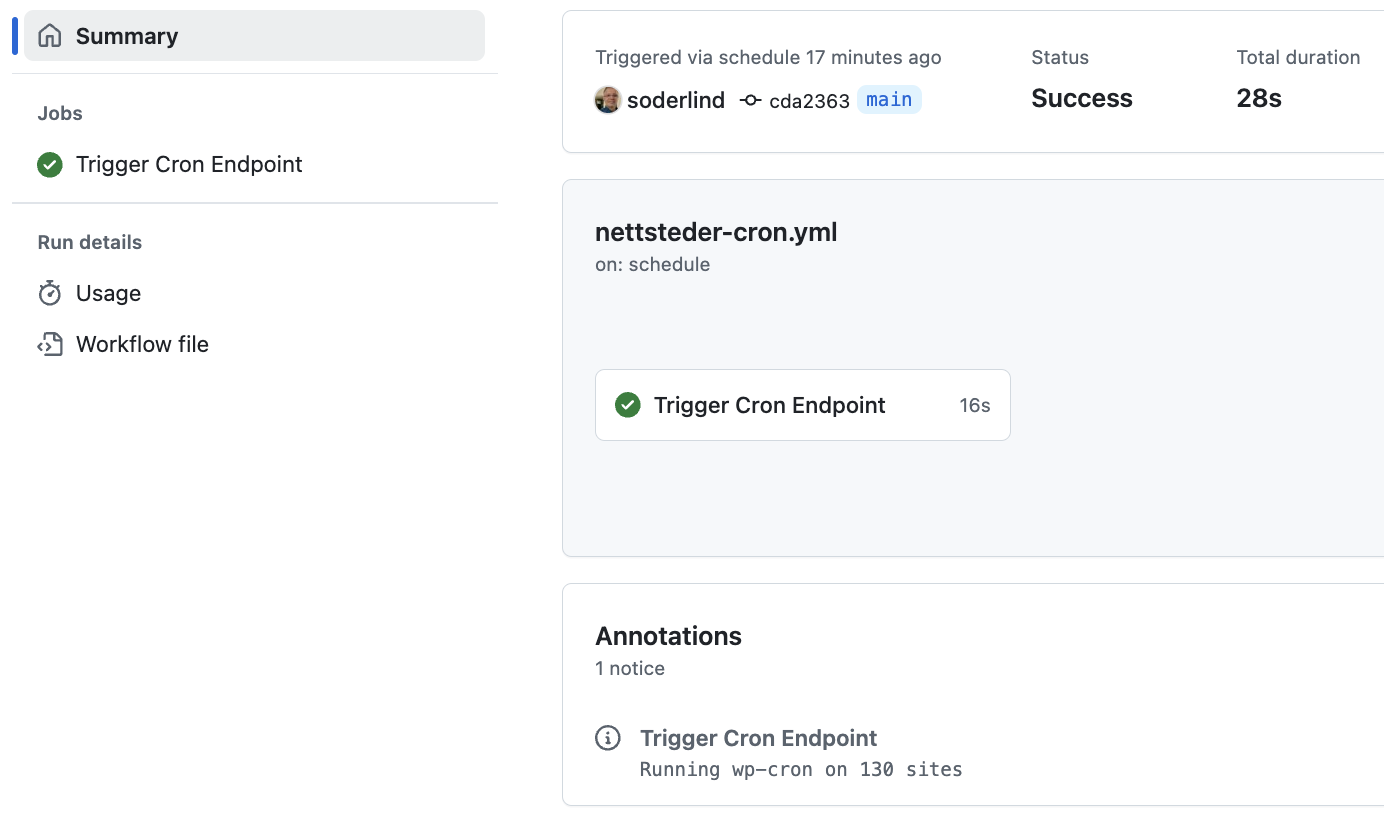
⏰ Trigger Options
Section titled “⏰ Trigger Options”-
(Preferred) Use a service like cron-job.org, pingdom.com, or easycron.com to call the endpoint every 5 minutes.
-
System Crontab (every 5 minutes):
*/5 * * * * curl -s https://example.com/wp-json/all-sites-cron/v1/run- GitHub Actions every 5 minutes. (5 minutes is the shortest interval in GitHub Actions):
name: All Sites Cron Jobon:  schedule:    - cron: '*/5 * * * *'
env:  CRON_ENDPOINT: 'https://example.com/wp-json/all-sites-cron/v1/run?ga=1&defer=1'
jobs:  trigger_cron:    runs-on: ubuntu-latest    timeout-minutes: 5    steps:      - run: |          curl -X GET ${{ env.CRON_ENDPOINT }} \            --connect-timeout 10 \            --max-time 30 \            --retry 3 \            --retry-delay 5 \            --silent \            --show-error \            --fail
Note: Using defer=1 is recommended for GitHub Actions to prevent timeout errors on large networks.
🔒 Authentication (Optional)
Section titled “🔒 Authentication (Optional)”By default the REST endpoints are public (backward-compatible). To require a shared-secret token:
-
Define the token in
wp-config.php:define( 'ALL_SITES_CRON_AUTH_TOKEN', 'your-long-random-secret' );Or store it as a site option:
update_site_option( 'all_sites_cron_auth_token', 'your-secret' ); -
Pass the token with requests:
Terminal window # Bearer header (preferred)curl -H "Authorization: Bearer your-long-random-secret" \https://example.com/wp-json/all-sites-cron/v1/run# Query parametercurl "https://example.com/wp-json/all-sites-cron/v1/run?token=your-long-random-secret"
When no token is configured the endpoints remain open.
Customization
Section titled “Customization”Filters
Section titled “Filters”Below is a complete list of filters provided by the plugin (including Redis + legacy aliases) that let you tune execution, performance, and infrastructure behavior.
| Filter | Type | Default | Purpose | Since |
|---|---|---|---|---|
all_sites_cron_rate_limit_seconds | int | 60 | Cooldown between runs (rate limiting) | 1.2.0 |
all_sites_cron_number_of_sites | int | 1000 | Max sites processed in one invocation | 1.0.7 (renamed 1.3.0) |
all_sites_cron_batch_size | int | 50 | Sites processed per batch (memory control) | 1.3.0 |
all_sites_cron_request_timeout | float | 0.01 | HTTP timeout per site cron dispatch (non-blocking) | 1.0.6 (renamed 1.3.0) |
all_sites_cron_use_redis_queue | bool | is_redis_available() | Whether deferred mode should use Redis queuing | 1.5.0 |
all_sites_cron_redis_host | string | 127.0.0.1 | Redis host for queue operations | 1.5.0 |
all_sites_cron_redis_port | int | 6379 | Redis port | 1.5.0 |
all_sites_cron_redis_db | int | 0 | Redis database index | 1.5.0 |
all_sites_cron_redis_queue_key | string | all_sites_cron:jobs | Redis key (list) that stores queued jobs | 1.5.0 |
https_local_ssl_verify | bool | false (contextual) | Core WP: SSL verification for local HTTP | (core) |
Notes:
https_local_ssl_verifyis a WordPress core filter, not defined by this plugin; we simply honor it when dispatching non‑blocking HTTP requests. See core docs for broader usage.- Legacy
dss_cron_*filters are still applied first internally (for backward compatibility) via theget_filter()helper, then the newerall_sites_cron_*version. Migrate to the new names; legacy ones will be removed in a future major release.
Examples
Section titled “Examples”Rate limiting:
add_filter( 'all_sites_cron_rate_limit_seconds', fn( $seconds ) => 120 ); // 2 minutes between runsLimit total sites:
add_filter( 'all_sites_cron_number_of_sites', fn( $max ) => 500 ); // Cap total processed sitesBatch size:
add_filter( 'all_sites_cron_batch_size', fn( $batch ) => 25 ); // Smaller batches to reduce memoryRequest timeout:
add_filter( 'all_sites_cron_request_timeout', fn( $timeout ) => 0.05 ); // 50ms per site dispatchall_sites_cron_require_auth
Section titled “all_sites_cron_require_auth”Control whether authentication is required for REST endpoints.
- Type:
bool - Default:
truewhen a token is configured,falseotherwise - New in: v2.0.0
// Force authentication even without a stored tokenadd_filter( 'all_sites_cron_require_auth', '__return_true' );https_local_ssl_verify
Section titled “https_local_ssl_verify”Redis connection:
add_filter( 'all_sites_cron_redis_host', fn() => 'redis.internal' );add_filter( 'all_sites_cron_redis_port', fn() => 6380 );add_filter( 'all_sites_cron_redis_db', fn() => 2 );Custom queue key:
add_filter( 'all_sites_cron_redis_queue_key', fn() => 'network_cron:jobs' );Enable SSL verification (core filter):
add_filter( 'https_local_ssl_verify', '__return_true' );Filter Usage Examples
Section titled “Filter Usage Examples”Large Network Configuration (1000+ sites):
// Process more sites in smaller batchesadd_filter( 'all_sites_cron_number_of_sites', fn() => 2000 );add_filter( 'all_sites_cron_batch_size', fn() => 25 );add_filter( 'all_sites_cron_rate_limit_seconds', fn() => 180 ); // 3 minutesSmall Network Configuration (< 100 sites):
// Faster processing with larger batchesadd_filter( 'all_sites_cron_batch_size', fn() => 100 );add_filter( 'all_sites_cron_rate_limit_seconds', fn() => 30 ); // 30 secondsDevelopment/Testing Configuration:
// More aggressive settings for testingadd_filter( 'all_sites_cron_rate_limit_seconds', fn() => 10 ); // 10 secondsadd_filter( 'all_sites_cron_batch_size', fn() => 5 );add_filter( 'all_sites_cron_request_timeout', fn() => 0.1 );Legacy Filters (Deprecated)
Section titled “Legacy Filters (Deprecated)”Legacy aliases still applied (old → new):
| Legacy | Current | Notes |
|---|---|---|
dss_cron_rate_limit_seconds | all_sites_cron_rate_limit_seconds | Cooldown between runs |
dss_cron_number_of_sites | all_sites_cron_number_of_sites | Total sites cap |
dss_cron_request_timeout | all_sites_cron_request_timeout | Per-site HTTP timeout |
dss_cron_sites_transient | (removed) | Removed in 1.3.0 (batch processing made it obsolete) |
Migration tip:
// Old:add_filter( 'dss_cron_number_of_sites', fn() => 300 );// New:add_filter( 'all_sites_cron_number_of_sites', fn() => 300 );Using the Incoming Filter Parameter
Section titled “Using the Incoming Filter Parameter”All filter callbacks receive the current value as the first parameter. You can modify relative to the incoming value instead of hard‑coding:
// Increase existing rate limit by 30 seconds (but cap at 300):add_filter( 'all_sites_cron_rate_limit_seconds', fn( $seconds ) => min( $seconds + 30, 300 ) );
// Halve the batch size dynamically (never less than 10):add_filter( 'all_sites_cron_batch_size', fn( $batch ) => max( 10, (int) floor( $batch / 2 ) ) );
// Scale the max sites based on environment variable:add_filter( 'all_sites_cron_number_of_sites', fn( $current ) => getenv( 'ASC_MAX_SITES' ) ? (int) getenv( 'ASC_MAX_SITES' ) : $current );
// Add a safety floor for the request timeout (never below 0.01):add_filter( 'all_sites_cron_request_timeout', fn( $timeout ) => max( 0.01, $timeout ) );
// Dynamically choose Redis queue key per environment (prefix existing):add_filter( 'all_sites_cron_redis_queue_key', fn( $key ) => 'prod_' . $key );
Interpreting Rate Limiting
Section titled “Interpreting Rate Limiting”If called again before the cooldown finishes the API returns HTTP 429 with JSON:
{ "success": false, "error": "rate_limited", "message": "Rate limited. Try again in 37 seconds.", "retry_after": 37, "cooldown": 60, "last_run_gmt": 1696071234, "timestamp": "2025-09-30 12:35:23"}Headers include: Retry-After: <seconds>.
Benefits of REST mode
Section titled “Benefits of REST mode”- No rewrite rules to flush: activation is simpler and avoids edge cases with 404s or delayed availability.
- No unexpected 301 canonical/trailing‑slash redirects: direct, cache‑friendly 200 responses.
- Versioned, discoverable endpoint (
/wp-json/all-sites-cron/v1/run) integrates with the WP REST index and tooling. - Consistent structured JSON by default plus optional GitHub Actions text via
?ga=1. - Proper HTTP status codes (e.g. 429 for rate limiting, 400 for invalid context) instead of a blanket 200.
- Easy extensibility: future endpoints (status, logs, defer mode, auth) can be added under the same namespace without new rewrites.
- Reduced theme / front‑end interference: bypasses template loading and front‑end filters tied to
template_redirect. - Better compatibility with CDNs and monitoring: REST semantics and headers are predictable and cache‑aware.
- Straightforward integration in external systems (CI/CD, orchestration) that already speak JSON.
- Built‑in argument handling and potential for schema/permission hardening via
permission_callback. - Clean separation of concerns: routing (REST) vs. execution logic (cron dispatcher) improves maintainability.
- Clear place to implement enhancements (rate limiting, future defer/background mode, auth tokens, metrics) with minimal risk.
- Easier automated testing using WP REST API test utilities (no need to simulate front‑end rewrite resolution).
- Avoids canonical redirect filter hacks previously needed to suppress 301s on
/dss-cron. - Safer for multi‑environment deployments (no dependency on rewrite flush timing during deploy pipelines).
Copyright and License
Section titled “Copyright and License”All Sites Cron is copyright 2024–2025 Per Soderlind
All Sites Cron is free software: you can redistribute it and/or modify it under the terms of the GNU General Public License as published by the Free Software Foundation, either version 2 of the License, or (at your option) any later version.
All Sites Cron is distributed in the hope that it will be useful, but WITHOUT ANY WARRANTY; without even the implied warranty of MERCHANTABILITY or FITNESS FOR A PARTICULAR PURPOSE. See the GNU General Public License for more details.
You should have received a copy of the GNU Lesser General Public License along with the Extension. If not, see http://www.gnu.org/licenses/.
Migration Note
Section titled “Migration Note”The plugin was renamed from “DSS Cron” (slug: dss-cron) to “All Sites Cron” (slug: all-sites-cron). The old REST namespace dss-cron/v1 is still registered for backward compatibility, but you should migrate your automation scripts to use all-sites-cron/v1. Legacy WordPress filters like dss_cron_number_of_sites continue to work; new code should use the all_sites_cron_* equivalents.
📦 Source: soderlind/all-sites-cron · Edit on GitHub