
New site — Virtual Media Folders now has its own home.
Visit vmf.soderlind.no →
Loupe Search Block
A search block for Loupe Search: live results as you type, a post type filter, category and tag facets, and sorting.
Loupe Search itself is engine-only. This add-on talks to it only through its public REST API (ADR 0002).
Requirements
Section titled “Requirements”- WordPress 6.9+
- PHP 8.3+
- Loupe Search 1.4.0+ (needs the
GET /search-fieldsroute)
Features
Section titled “Features”- Search as you type, with results, facets, sorting and pagination inside the block (Interactivity API).
- Post type filter for every post type Loupe Search indexes.
- Category and tag facets with result counts, for fields marked Filterable in Settings → Loupe Search.
- Sort: Relevance, Newest first, Oldest first, Title A–Z, Title Z–A. Date sorts need
post_dateto be Sortable; title sorts needpost_titleto be Sortable. Options that are not allowed are hidden. - Highlighted snippets around the matched words.
- Works without JavaScript: the block falls back to a plain search form that submits
?s=to the site’s search page. - Search insights: only the query a visitor settles on (or submits with Enter) is counted in Loupe Search’s Search insights, so search-as-you-type does not inflate the numbers.
Facets and sorts follow Loupe Search’s rules: when a search covers several post types, a field is only offered if it is allowed for all of them.
- Install and activate Loupe Search, and reindex.
- Install and activate Loupe Search Block.
- Add the Loupe Search block (
loupe-search/search) to a page or template.
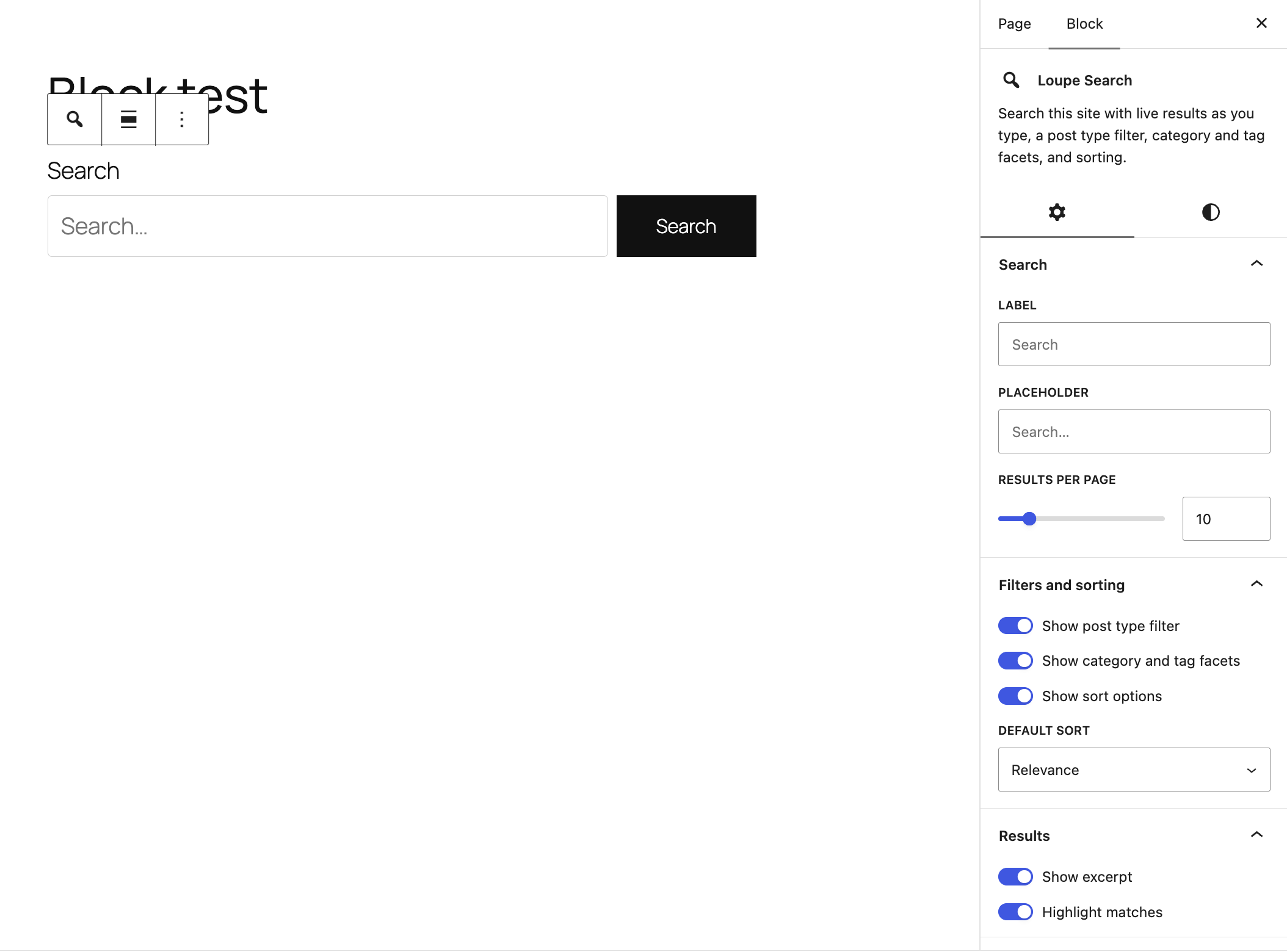
Block settings
Section titled “Block settings”| Setting | Default | Notes |
|---|---|---|
| Label | “Search” | |
| Placeholder | “Search…” | |
| Results per page | 10 | 1–100 |
| Show post type filter | On | Hidden when only one post type is indexed |
| Show category and tag facets | On | |
| Show sort options | On | |
| Default sort | Relevance | Falls back to Relevance if the field is not Sortable |
| Show excerpt | On | |
| Highlight matches | On |
The block also supports wide/full alignment, margin, padding, and text and background colors.
Development
Section titled “Development”npm installcomposer installnpm run build # or: npm startnpm test # Jestcomposer test # PHPUnitnpm run lint:jsPlanned
Section titled “Planned”Author, date and custom-field filters (#71).
License
Section titled “License”GPL-2.0-or-later. See LICENSE.
📦 Source: soderlind/loupe-search-block · Edit on GitHub