
New site — Virtual Media Folders now has its own home.
Visit vmf.soderlind.no →
AI Alt Text
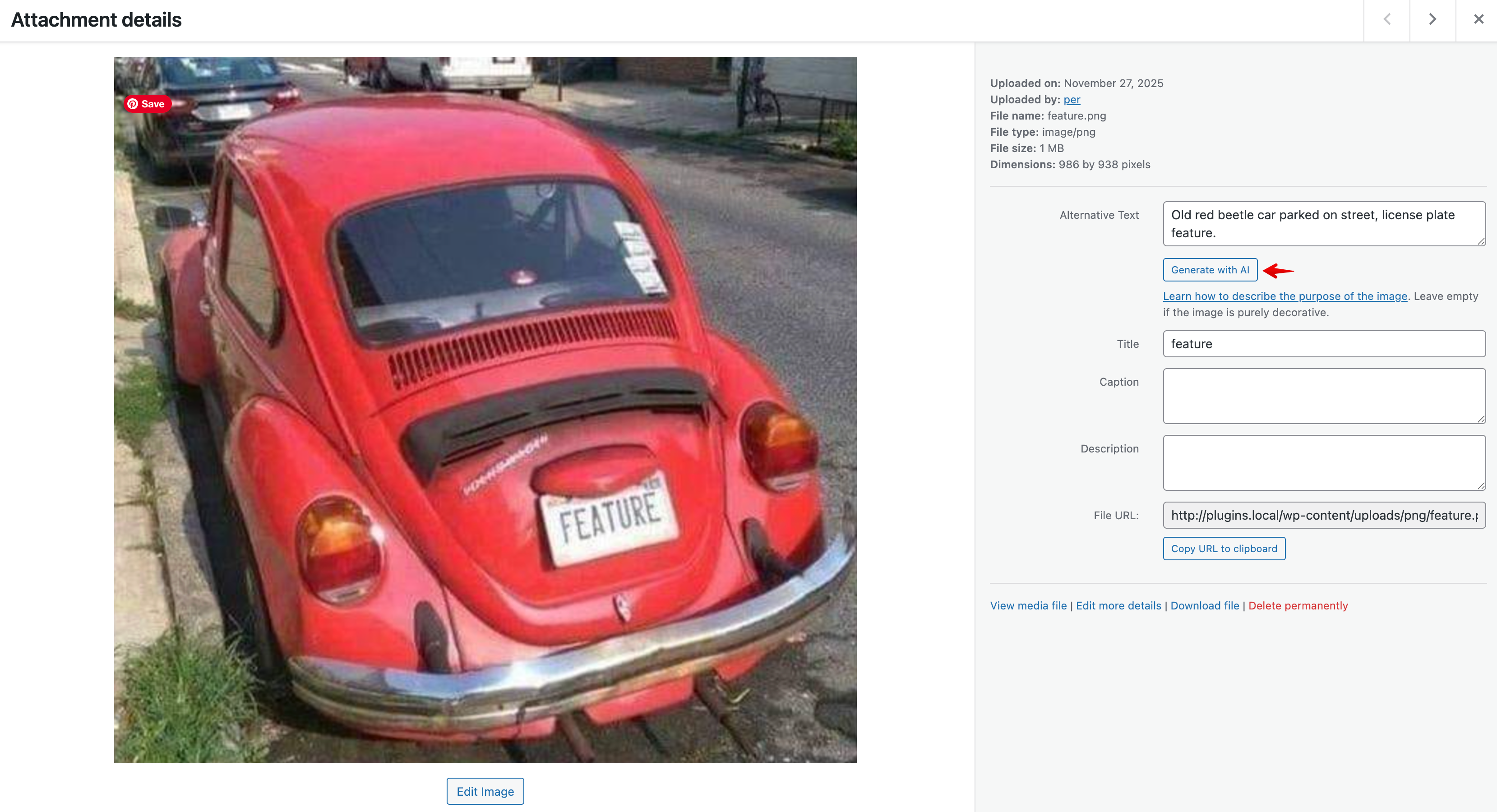
Generate alt text for images using AI. Supports multiple AI providers including OpenAI, Claude, Gemini, Ollama, Azure OpenAI, and Grok.
Features
Section titled “Features”- Bulk Update: Update alt text for multiple images at once from the media library
- Block Editor Integration: Generate alt text directly from the image block in the editor
- Multiple AI Providers: Choose from OpenAI (GPT-4o), Anthropic Claude, Google Gemini, Azure OpenAI, Ollama (local), or Grok
- Language Detection: Automatically uses WordPress language settings for generated alt text
- Flexible Configuration: Configure via constants, environment variables, or the admin settings page
Requirements
Section titled “Requirements”- WordPress 6.8 or higher
- PHP 8.3 or higher
- API key for your chosen AI provider (except Ollama which runs locally)
Installation
Section titled “Installation”-
Quick Install
- Download
ai-alt-text.zip - Upload via Plugins > Add New > Upload Plugin
- Activate the plugin.
- Go to Settings → AI Alt Text to configure your AI provider
- Download
-
Composer Install
Terminal window composer require soderlind/ai-alt-text -
Updates
- Plugin updates are handled automatically via GitHub. No need to manually download and install updates.
Configuration
Section titled “Configuration”Via Admin Settings
Section titled “Via Admin Settings”Navigate to Settings → AI Alt Text and configure:
- Select your AI provider
- Enter your API key
- Optionally customize the model and other settings
Via Constants (wp-config.php)
Section titled “Via Constants (wp-config.php)”// AI Provider: 'openai', 'anthropic', 'gemini', 'azure', 'ollama', 'grok'define( 'AI_ALT_TEXT_PROVIDER', 'openai' );
// API Keydefine( 'AI_ALT_TEXT_API_KEY', 'your-api-key-here' );
// Optional: Custom modeldefine( 'AI_ALT_TEXT_MODEL', 'gpt-4o' );
// Azure-specific settingsdefine( 'AI_ALT_TEXT_AZURE_ENDPOINT', 'https://your-resource.openai.azure.com' );define( 'AI_ALT_TEXT_AZURE_DEPLOYMENT', 'your-deployment-name' );
// Ollama-specific settingsdefine( 'AI_ALT_TEXT_OLLAMA_HOST', 'http://localhost:11434' );Via Environment Variables
Section titled “Via Environment Variables”AI_ALT_TEXT_PROVIDER=openaiAI_ALT_TEXT_API_KEY=your-api-key-hereAI_ALT_TEXT_MODEL=gpt-4oBulk Update
Section titled “Bulk Update”- Go to Media → Library (list view)
- Select images you want to update
- Choose “Generate AI Alt Text” from the bulk actions dropdown
- Click “Apply”
From the Block Editor
Section titled “From the Block Editor”- Add or select an image block
- In the sidebar, find the “AI Alt Text” panel
- Click “Generate Alt Text with AI”
AI Providers
Section titled “AI Providers”| Provider | Model | Notes |
|---|---|---|
| OpenAI | gpt-4o | Requires API key from OpenAI |
| Anthropic | claude-sonnet-4-20250514 | Requires API key from Anthropic |
| Google Gemini | gemini-2.0-flash | Requires API key from Google AI Studio |
| Azure OpenAI | gpt-4o | Requires Azure subscription and deployment |
| Ollama | llava | Free, runs locally. Install from ollama.ai |
| Grok | grok-2-vision-1212 | Requires API key from xAI |
For detailed configuration instructions, see AI Provider Documentation.
Hooks & Filters
Section titled “Hooks & Filters”Modify Generated Alt Text
Section titled “Modify Generated Alt Text”add_filter( 'ai_alt_text_generated', function( $alt_text, $attachment_id ) { // Modify the generated alt text return $alt_text;}, 10, 2 );Customize the AI Prompt
Section titled “Customize the AI Prompt”add_filter( 'ai_alt_text_prompt', function( $prompt, $language ) { // Customize the prompt sent to the AI return $prompt;}, 10, 2 );Skip Auto-generation for Specific Images
Section titled “Skip Auto-generation for Specific Images”add_filter( 'ai_alt_text_should_generate', function( $should_generate, $attachment_id ) { // Return false to skip auto-generation return $should_generate;}, 10, 2 );Translations
Section titled “Translations”The plugin is translation-ready. Translation files are located in the languages/ directory.
Creating a Translation
Section titled “Creating a Translation”- Copy
languages/ai-alt-text.pottolanguages/ai-alt-text-{locale}.po- Example:
ai-alt-text-nb_NO.pofor Norwegian Bokmål - Example:
ai-alt-text-de_DE.pofor German
- Example:
- Translate the strings using Poedit or similar tool
- Save to generate the
.mofile - For JavaScript translations, run:
Terminal window wp i18n make-json languages/
Available Locales
Section titled “Available Locales”Contributions welcome! Submit your translation via a pull request.
Development
Section titled “Development”Building Assets
Section titled “Building Assets”npm installnpm run buildRunning Tests
Section titled “Running Tests”# JavaScript testsnpm test
# PHP tests./vendor/bin/phpunitCode Standards
Section titled “Code Standards”# Check PHP code standards./vendor/bin/phpcs
# Fix PHP code standards./vendor/bin/phpcbfLicense
Section titled “License”GPL v2 or later. See LICENSE for details.
Credits
Section titled “Credits”Developed by Per Soderlind.
Support
Section titled “Support”📦 Source: soderlind/ai-alt-text · Edit on GitHub